Apple CarPlay Not Working in Your Mercedes: Causes and Fixes
Why Apple CarPlay fails in a Mercedes-Benz, how to read the message on the screen and which checks of the iPhone, cable, port and wireless connection solve it.
Table of contents
- What the screen is telling you
- "Apple CarPlay could not be started"
- The iPhone charges, but CarPlay does not start
- Wireless CarPlay will not connect or keeps dropping
- CarPlay stopped working after an update
- Pairing the iPhone and the car again
- Sprinter, Vito and other models
- When the fault is in the car
- Conclusion
When Apple CarPlay stops working in a Mercedes, the cause almost always sits in one of three places: the car, the connection between the car and the phone, or the iPhone itself. The symptoms look alike from the driver's seat, but the fixes are different, and changing things at random usually costs more time than it saves.
The quickest way to the cause is to read what the screen shows. An error message, a phone that charges but does nothing, a connection that drops after a few minutes: each points to a different part of the chain. One case is not a fault at all. If the car has never shown a CarPlay item in its menu, the function is most likely switched off, and the answer is in our guide to Apple CarPlay in a Mercedes, not in troubleshooting.
What the screen is telling you
Before you change any setting, note exactly what happens when you plug in or get into the car. The table pairs the most common symptoms in Mercedes-Benz cars with their likely cause and the first thing to check:
| What you see | Most likely cause | Where to start |
|---|---|---|
| The message "Apple CarPlay could not be started" | CarPlay is active in the car, but the start failed because of the cable, the port or an iPhone setting | iPhone settings, then the cable |
| The iPhone charges, but no data protection notice and no CarPlay appear | A charge-only cable, a port without the smartphone integration symbol, or CarPlay switched off in the car | Data cable in the marked port; if nothing changes, activation |
| There is no CarPlay item in the menu at all | The function was never enabled on this car | Activation, not troubleshooting |
| CarPlay works with a cable but not without one | The car supports only wired CarPlay, or Bluetooth and Wi-Fi settings block the wireless connection | Head unit generation, then the iPhone's Wi-Fi settings |
| CarPlay starts and then drops | A worn cable or adapter, a loose plug, or an unstable wireless link | A different direct cable; for wireless, the Auto-Join setting |
| CarPlay stopped working after an update | Old pairing data on the iPhone or in the car | Pairing the iPhone and the car again |
| Another iPhone works, yours does not | A setting or restriction on your iPhone | Siri, Screen Time and the CarPlay settings on your phone |
Work through one row at a time and test CarPlay after every change. If you change three things at once and CarPlay comes back, you will not know which one helped, and the same problem will be just as confusing the next time it appears.
"Apple CarPlay could not be started"
This message, with its variants "CarPlay cannot be started" and "CarPlay is not starting", is one of the most frequent CarPlay questions from Mercedes owners, and it carries good news. The car has recognized the iPhone and tried to open CarPlay, so the function is active and the head unit can run it. What failed is the start itself, and the cause is usually the cable, the port or a setting on the phone.
Start with the iPhone, because its settings take a minute to check and need no tools. Apple's own CarPlay troubleshooting guide lists the same points, and in practice these are the ones that block the start:
- Siri is turned on. CarPlay relies on Siri, and with Siri off it cannot start.
- CarPlay is not restricted. In Settings, open Screen Time, then Content & Privacy Restrictions. If restrictions are on, open Allowed Apps and make sure CarPlay is enabled.
- CarPlay is allowed while the phone is locked. In Settings, open General, then CarPlay, select your car and turn on "Allow CarPlay While Locked".
- The iPhone runs the latest version of iOS.
Restrictions are easy to miss, because Screen Time may have been set up long ago for a different reason. With CarPlay blocked there, the car sees the iPhone but CarPlay never opens. If all four points are in order and the message stays, move on to the cable and the port, because the rest of the causes are physical.
If you are connecting for the first time or after a long break, follow the order described in the CarPlay guide: ignition on, iPhone unlocked, data protection notice accepted on the car's screen. CarPlay opens only after this notice has been accepted.
The iPhone charges, but CarPlay does not start
A phone that charges proves only that power reaches it. CarPlay needs a data connection as well, and a Mercedes provides one only through specific ports. This is why "CarPlay not working when plugged in" and "USB port not working" are among the most frequent searches: the phone reacts, so the port seems fine, yet the data never arrives.
The first suspect is the port. CarPlay works only through the USB port marked with the smartphone integration symbol, an outline of a phone next to an outline of a screen. Many Mercedes cars have several ports in the center console, armrest and rear, and the others only charge. A phone connected to any of them charges normally and never shows CarPlay or a "no device connected" change on the screen.
The second suspect is the cable. Charge-only cables look identical to data cables, and a cable that is damaged at the plug can still charge the phone while the data connection fails. iPhone 15 and newer models use USB-C, older ones Lightning. Apple notes that some combinations of adapters, cables and car systems disrupt the wired connection, so for an iPhone with USB-C, a direct cable that fits the car's port works more reliably than a chain of adapters.
A short test with a spare data cable and a second iPhone separates the possible causes in a few minutes. Each step rules out one suspect, so stop at the first one that brings CarPlay back:
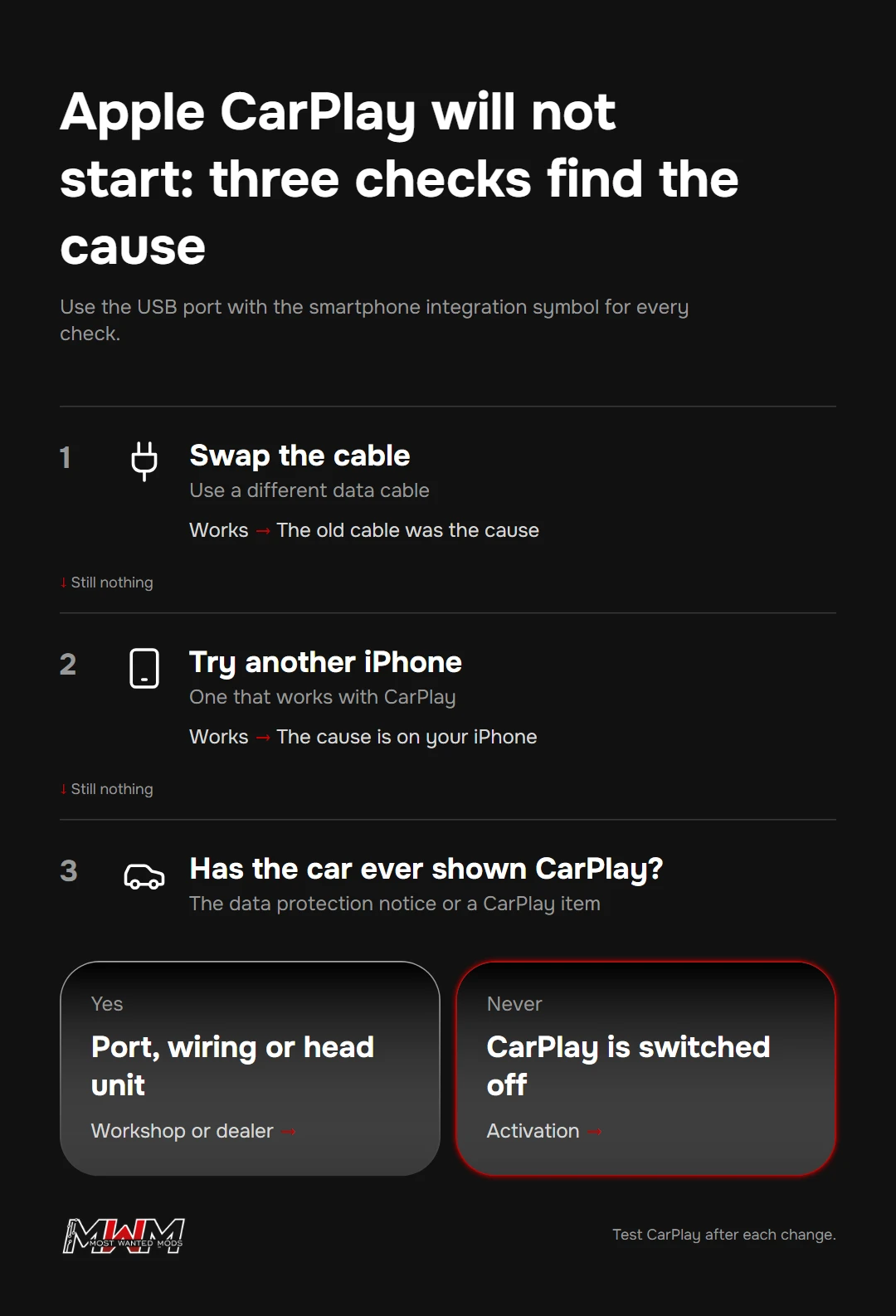
When no iPhone starts CarPlay with a good cable, there are two possibilities. Either the port or the wiring behind it is faulty, which a workshop can confirm, or CarPlay is switched off in the car. A car with the function switched off never shows the data protection notice, no matter which cable or phone you use.
Wireless CarPlay will not connect or keeps dropping
The first question with wireless problems is whether the car supports wireless CarPlay at all. Only newer MBUX systems do. NTG 5 cars and early MBUX versions connect by cable, even though they pair with the iPhone over Bluetooth for calls. On such a car, a phone that connects to Bluetooth but never opens CarPlay wirelessly is working exactly as designed.
On a car that supports wireless CarPlay, both radios of the iPhone are involved. Bluetooth starts the connection, and the picture and sound then travel over a Wi-Fi network that the car creates. If either is off, or if the phone does not join the car's network on its own, CarPlay does not appear or appears only now and then.
Check Bluetooth and Wi-Fi first: both must be on in the iPhone's settings, and Airplane Mode must be off. Then open the Wi-Fi settings, select the car's CarPlay network and make sure Auto-Join is on. Without Auto-Join, the iPhone does not reconnect to the car on its own. If CarPlay does not open by itself, look for the CarPlay icon on the car's screen and select it.
When the connection keeps dropping, a cable is the best diagnostic tool, even on a car with wireless CarPlay. If CarPlay holds steady over a good cable in the marked port, the car, the phone and their software are fine, and the problem is limited to the wireless link. Pairing again from scratch, as described below, is then the next step. If CarPlay drops over the cable as well, look at the cable, the plug and the port: a plug that moves in the socket while driving interrupts the data line for a moment, and CarPlay restarts each time.
CarPlay stopped working after an update
When CarPlay worked for months and stopped after an update, the question is which side was updated. An iOS update changes the phone, a software update at a dealer changes the car, and each points to a different fix.
After an iOS update, restart the iPhone and the car first. If that does not help, remove the car from the iPhone's CarPlay settings and set the connection up again, as Apple recommends. A fresh pairing replaces everything the phone and the car stored about each other before the update. Apple also recommends keeping the car's system on the latest firmware from the manufacturer, because the car and the phone have to work with the same version of the CarPlay protocol.
After a visit to the dealer, look at the menu. If the CarPlay item is still there but CarPlay will not start, pair the iPhone again as described below. If the item is gone completely, the update most likely wrote the factory configuration back into the head unit. This can happen with functions that were activated outside the dealer network, and our guide to Mercedes coding explains why. The function is not lost: it can be activated again in the same way.
Pairing the iPhone and the car again
When the cause is not obvious, a clean pairing is the step that covers the widest range of CarPlay problems, from repeated start errors to wireless connections that drop. It deletes what the phone and the car have stored about each other and builds the connection from scratch. Do the steps in this order, with the car parked and the ignition on:
- On the iPhone, open Settings, then General, then CarPlay, select your Mercedes and tap "Forget This Car".
- In the car, open the list of connected devices in the telephone or connect menu and delete your iPhone from it.
- Restart the iPhone and switch the car off and on again.
- Connect the iPhone with a data cable to the port with the smartphone integration symbol and accept the data protection notice on the car's screen.
- On a car with wireless CarPlay, set up the wireless connection only after CarPlay has started over the cable.
Starting with the cable even on a wireless car is deliberate. The cable connection has fewer variables, so if it works, the car and the phone are proven to be compatible and correctly configured, and any later problem can only be in the wireless part. If CarPlay does not start even after a clean pairing over a good cable, the remaining causes are in the car.
Sprinter, Vito and other models
Many searches name a specific model: CarPlay not working in a C300, a GLA, a CLA, an A-Class or an E-Class. The causes and fixes in this guide are the same for all of them, because CarPlay is run by the head unit, not by the body around it. What differs between models is the generation of that head unit: NTG 5 or MBUX, and on MBUX, cable only or also wireless.
The system behind the screen therefore tells you more than the model badge. A C-Class from the early years of the W205 generation and a current C-Class share the name, but the first connects only by cable and may have CarPlay switched off, while the second has it as standard and can connect wirelessly. The overview by chassis and head unit shows which system your car is likely to have.
Mercedes vans are a separate case. The Sprinter and the Vito use their own radios and infotainment systems, which differ from those in the passenger cars. The general checks of cable, port and iPhone settings still apply, but what the radio supports and where its settings are depends on the exact equipment. Such vans are best checked by VIN with a specialist before anything is changed.
When the fault is in the car
After the settings, the cable test and a clean pairing, the remaining causes are in the car. A few signs show this clearly: no iPhone starts CarPlay with a known good data cable in the marked port, the port does not even charge, or the screen freezes and restarts also when CarPlay is not in use. A faulty port, wiring or head unit is a job for a workshop, and while the car is under warranty, for the dealer.
One situation only looks like a fault. If the port works, the phone charges and connects for calls, but the car has never shown a CarPlay item or the data protection notice, CarPlay is switched off in the head unit. On NTG 5 cars this is common, because CarPlay was an option, and no setting or cable will bring it back.
Such a car needs activation, and the MWMods CarPlay and Android Auto module does it without a workshop visit. It connects to the OBD-II port, switches on Apple CarPlay and Android Auto, and is prepared for your car after a VIN check. Once CarPlay is active, the connection is set up in a minute, and everything in this guide applies to it as to any factory CarPlay.
Conclusion
When CarPlay fails in a Mercedes, the message on the screen points to the right place to look. "Could not be started" means the car can run CarPlay and the problem is a cable, a port or an iPhone setting. A phone that only charges points to the cable and the port, and a wireless connection that drops is best checked with a cable first.
Most cases end with a different data cable, the right port, the iPhone settings or a fresh pairing. If no iPhone starts CarPlay with a good cable, the cause is in the car: a workshop job when CarPlay worked before, and activation when the car has never shown it.